Bug Giggles: Injecting Playful Energy into Your Next Project
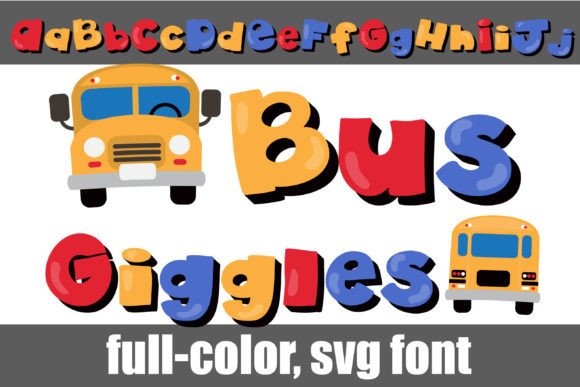
If you've ever stared at a blank canvas trying to figure out how to make a brand feel more approachable or a design feel less sterile, you know that typography is the secret weapon most people overlook. We often get stuck in the "safe" zone, relying on Helvetica or Open Sans because they are reliable, but reliability doesn't always sell a product or engage an audience. Sometimes, you need a typeface that literally pops out of the screen with personality. Enter Bug Giggles, a premium font that breaks the mold of traditional text-based design. This isn't just another typeface; it is a full-color (SVG) font that brings a vibrant, primary-colored aesthetic with heavy black shadows directly to your artwork, mimicking the bold, tactile feel of vintage stickers or retro toys.
Understanding the SVG Color Font Revolution
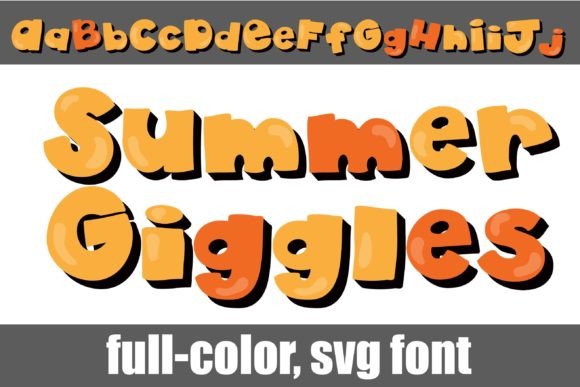
Before we dive into the creative applications, it is important to understand exactly what you are working with. Bug Giggles is an OpenType full-color (SVG) font. For years, designers were limited to flat, single-color text unless they manually added effects in Photoshop or Illustrator. SVG fonts change the game by embedding vector graphics directly into the font file. This means the primary colored lettering and the heavy black shadows you see in the preview are baked right in.
Installing this font is just like installing any standard .otf file. Mac users can simply open FontBook, while Windows users can use their preferred font manager or Control Panel. However, there is a practical reality to modern typography that you need to be aware of: compatibility. Because these files contain complex color data, they will appear as solid black silhouettes in older programs or non-compatible software. This is normal. You will know your program supports the full color capabilities—such as Adobe Photoshop, Illustrator, Silhouette Studio, Quark, or Inkscape—when you begin typing and see the vibrant hues appear on your document canvas. Even in compatible software, the preview window often shows the font in black, so don't panic if you don't see color immediately in the font drop-down menu.
Unlocking Creative Potential: Beyond the Basic Alphabet
The true value of a creative font like this lies in its versatility. At first glance, the heavy black drop shadows and bright primary colors suggest a specific, niche use case—perhaps children’s birthday invitations or toy packaging. While it excels there, limiting it to just one category would be a mistake. The font includes alternate versions of each letter in different colors, accessible via your system’s character map. This feature alone allows for a level of customization that is rare in standard design assets.
Consider the following practical applications where Bug Giggles can transform your work:
- Logo Design and Brand Identity: If you are a small business owner in the food, entertainment, or lifestyle sector, a generic serif font might make you look like everyone else. This typeface offers instant brand recognition. It signals that your brand is fun, approachable, and energetic.
- Social Media Graphics: In the endless scroll of Instagram or TikTok, you have milliseconds to capture attention. The 3D effect of the heavy shadows creates depth, making your text stop the scroll. It is perfect for sale announcements, "New Post" alerts, or quote graphics.
- Packaging Design: For physical products, particularly in the craft, snack, or novelty markets, this font mimics the look of high-end embossing or raised printing without the manufacturing cost. It adds a tactile quality to flat digital prints.
- Merchandise and Apparel: T-shirt designers often struggle with fonts that look too thin or get lost on fabric. The bold, blocky nature of this display font ensures legibility and impact on merchandise.
Technical Nuances and Workflow Integration
As a designer or content creator, integrating a new asset into your workflow needs to be seamless. One of the standout features of Bug Giggles is the inclusion of bus glyphs. These are unique pictograms accessed simply by typing the greater than (>) and less than (<) symbols. These glyphs are perfect for adding thematic icons to your editorial design or marketing assets without needing to search for separate vector illustrations.
However, working with SVG fonts requires a shift in mindset regarding color editing. Unlike standard fonts where you simply highlight the text and pick a new swatch, color fonts retain their embedded color data. To change the colors in Bug Giggles, you typically need to access the alternate characters provided in the file. The creators have included an alt version of each letter in a different color. This means you can mix and match to create a rainbow effect or stick to a specific color story that matches your brand identity. Using your system character map becomes an essential part of the design process here, allowing you to pick specific color variants for specific letters to achieve the perfect balance.
Strategic Typography: When to Use Display Fonts
While Bug Giggles is a fantastic tool, knowing when to use it is just as important as knowing how to use it. This is a display font, meaning it is designed for impact, not for long-form reading. You would not use this typeface for the body copy of a website or a lengthy blog post. The heavy shadows and distinct shapes would cause eye fatigue over large blocks of text.
Instead, the strategy lies in font pairing. To maintain professional presentation and readability, pair this bold, playful header font with a clean, neutral sans serif font for your body text. For example, a light weight of Montserrat or Roboto provides a quiet background that allows the colorful headlines to shine without competing for attention. This contrast creates a visual hierarchy that guides the reader’s eye exactly where you want it to go.
Practical Tips for Maximum Engagement
To get the most out of this premium font, consider these practical steps for your next project:
- Test Your Backgrounds: Because the font features heavy black shadows, it stands out best on lighter, solid backgrounds. Be cautious using it over busy photography, as the intricate details of the shadow might get lost, reducing readability.
- Check Licensing for Commercial Use: If you are using this for client work or selling merchandise, always double-check the licensing terms. Most premium fonts allow for commercial use, but it is good practice to verify the specifics for digital products versus physical goods.
- Scale with Confidence: Because the underlying technology is vector-based (SVG), you can scale these letters to massive sizes for posters or signage without losing quality. The lines will remain crisp, and the color transitions will stay smooth.
- Utilize the Alternates for Uniqueness: Don't just stick to the default "A" or "B". Dive into the character map and swap out letters to create a custom color sequence that matches your specific campaign palette. This level of detail elevates a design from "template-made" to "custom-crafted."
Ultimately, typography is about communication. While traditional fonts communicate professionalism and stability, Bug Giggles communicates joy, creativity, and energy. By understanding the technical capabilities of SVG color fonts and applying them strategically to your web design, packaging, or social media projects, you can bridge the gap between a standard layout and a memorable visual experience. Whether you are a hobbyist making stickers or a marketer launching a new product, this font provides the tools to make your text not just readable, but truly seen.